Redesigning the sign-up/log-in flows for 80% reduction in account duplications

Compound Planning is a digital wealth management platform serving high net-worth individuals.

Role

UX/UI on 2 person design team


Timeline

3 Weeks


Sector

Fintech

Context

The dashboard serves as a client's first touchpoint with Compound Planning.

Financial Advisors collaborate directly with their clients by inviting them to create financial dashboards to track their net worth. Any issues during account creation or login quickly erode user confidence in the product.

Challenge

Error-prone sign-up and login flows were creating friction at a critical touchpoint

After proactively monitoring the Engineering ticketing queue, I noticed a concerning pattern: clients were struggling to access their dashboard either due to forgotten credentials, or login method (Google/Apple SSO vs Auth0) and/or were accidentally creating duplicate accounts because of this.

Business was being impact by these issues. Engineers were constantly diverted from development work to manually merge duplicate accounts, and support teams faced an overwhelming volume of repetitive login-related requests, and users were losing fidelity in the product.

65

Requests to merge duplicate accounts over Q1 and Q2

65

Requests to merge duplicate accounts over Q1 and Q2

65

Requests to merge duplicate accounts over Q1 and Q2

20 min

Average time for an engineer to merge duplicate accounts

20 min

Average time for an engineer to merge duplicate accounts

20 min

Average time for an engineer to merge duplicate accounts

2.5

Average requests per week to merge accounts

2.5

Average requests per week to merge accounts

2.5

Average requests per week to merge accounts

22 hrs

Total engineering time spent on merge requests over 6 months

22 hrs

Total engineering time spent on merge requests over 6 months

22 hrs

Total engineering time spent on merge requests over 6 months

Research

Discovering cause and impact of process bottle-necks and confusion

With engineers continually diverted from their work to merge duplicate accounts, and internal support teams overwhelmed with repetitive login-related requests, it became essential to identify the root causes. To better understand the variables and painpoints I conducted the folllowing research.

(01)

Engineering Queue Analysis

Reviewed tickets in the engineering queue from Q1 and Q2

(01)

Engineering Queue Analysis

Reviewed tickets in the engineering queue from Q1 and Q2

(01)

Engineering Queue Analysis

Reviewed tickets in the engineering queue from Q1 and Q2

(02)

Support Inbox Review

Reviewed 40+ support inbox emails

(02)

Support Inbox Review

Reviewed 40+ support inbox emails

(02)

Support Inbox Review

Reviewed 40+ support inbox emails

(03)

Stakeholder Interviews

Spoke with engineers, financial advisors, and product team

(03)

Stakeholder Interviews

Spoke with engineers, financial advisors, and product team

(03)

Stakeholder Interviews

Spoke with engineers, financial advisors, and product team

(04)

Analytics Review

Examined login patterns and error rates

(04)

Analytics Review

Examined login patterns and error rates

(04)

Analytics Review

Examined login patterns and error rates

Research Synthesis

Root causes identified

SSO Hesitation

Initially, users were restricted to signing up through Google SSO or Apple ID. When Auth0 (email/password) was introduced as an additional option, many clients preferred it due to privacy concerns about third-party authentication. This led some users to create entirely new accounts instead of continuing with their existing SSO-based accounts.

SSO Hesitation

Initially, users were restricted to signing up through Google SSO or Apple ID. When Auth0 (email/password) was introduced as an additional option, many clients preferred it due to privacy concerns about third-party authentication. This led some users to create entirely new accounts instead of continuing with their existing SSO-based accounts.

SSO Hesitation

Initially, users were restricted to signing up through Google SSO or Apple ID. When Auth0 (email/password) was introduced as an additional option, many clients preferred it due to privacy concerns about third-party authentication. This led some users to create entirely new accounts instead of continuing with their existing SSO-based accounts.

Login Method Restrictions

The system only supported the login method a client initially used to create their account. If a user tried logging in with Auth0 using the same email they previously used with Google or Apple SSO, the system showed "no account found," causing significant confusion. Adding Auth0 to an existing SSO-based account required manual engineering support, which wasn't scalable.

Login Method Restrictions

The system only supported the login method a client initially used to create their account. If a user tried logging in with Auth0 using the same email they previously used with Google or Apple SSO, the system showed "no account found," causing significant confusion. Adding Auth0 to an existing SSO-based account required manual engineering support, which wasn't scalable.

Login Method Restrictions

The system only supported the login method a client initially used to create their account. If a user tried logging in with Auth0 using the same email they previously used with Google or Apple SSO, the system showed "no account found," causing significant confusion. Adding Auth0 to an existing SSO-based account required manual engineering support, which wasn't scalable.

Weak Email Verification

Email verification wasn't required after sign-up, allowing users to proceed with mistyped or unverified emails. When they later needed a password reset, engineering had to manually intervene, creating unnecessary support work and frustrating users.

Weak Email Verification

Email verification wasn't required after sign-up, allowing users to proceed with mistyped or unverified emails. When they later needed a password reset, engineering had to manually intervene, creating unnecessary support work and frustrating users.

Weak Email Verification

Email verification wasn't required after sign-up, allowing users to proceed with mistyped or unverified emails. When they later needed a password reset, engineering had to manually intervene, creating unnecessary support work and frustrating users.

Similar Login and Sign-up Screens

The visual similarity between login and sign-up screens, combined with nearly identical SSO button copy like "Continue with Google/Apple," made it difficult for users to recognize whether they were creating an account or logging into an existing one. This confusion directly contributed to duplicate account creation.

Similar Login and Sign-up Screens

The visual similarity between login and sign-up screens, combined with nearly identical SSO button copy like "Continue with Google/Apple," made it difficult for users to recognize whether they were creating an account or logging into an existing one. This confusion directly contributed to duplicate account creation.

Similar Login and Sign-up Screens

The visual similarity between login and sign-up screens, combined with nearly identical SSO button copy like "Continue with Google/Apple," made it difficult for users to recognize whether they were creating an account or logging into an existing one. This confusion directly contributed to duplicate account creation.

No 'Existing Account' Detection

Many users had previously created accounts but forgot about them. When they later tried to use an advisor referral link, they were met with error messages because the links only worked for new accounts. Since the system didn't detect or alert them to their existing account, users were left confused and unable to access their advisor-linked dashboard.

No 'Existing Account' Detection

Many users had previously created accounts but forgot about them. When they later tried to use an advisor referral link, they were met with error messages because the links only worked for new accounts. Since the system didn't detect or alert them to their existing account, users were left confused and unable to access their advisor-linked dashboard.

No 'Existing Account' Detection

Many users had previously created accounts but forgot about them. When they later tried to use an advisor referral link, they were met with error messages because the links only worked for new accounts. Since the system didn't detect or alert them to their existing account, users were left confused and unable to access their advisor-linked dashboard.

Project Constraints

Minimize engineering involvement and design scope

Working with a small cross-functional team (1 Product Manager, 2 Engineers, 2 Designers), we faced important technical limitations:

  • No ability to update or change a user's email on file

  • No support for linking multiple authentication methods to one email

  • Limited engineering resources for backend authentication changes

How might we...

Focus on frontend clarity, wayfinding, and proactively guiding users to the correct login method—without relying on structural changes to authentication logic?

How might we...

Focus on frontend clarity, wayfinding, and proactively guiding users to the correct login method—without relying on structural changes to authentication logic?

How might we...

Focus on frontend clarity, wayfinding, and proactively guiding users to the correct login method—without relying on structural changes to authentication logic?

Design Strategy

Core design objectives

Findability

Improve visual hierarchy and wayfinding cues (including clearer microcopy and CTAs) so users can clearly distinguish "Create Account" vs. "Log In" and confidently choose the correct path.

Findability

Improve visual hierarchy and wayfinding cues (including clearer microcopy and CTAs) so users can clearly distinguish "Create Account" vs. "Log In" and confidently choose the correct path.

Findability

Improve visual hierarchy and wayfinding cues (including clearer microcopy and CTAs) so users can clearly distinguish "Create Account" vs. "Log In" and confidently choose the correct path.

Smart Authentication

Detect existing accounts tied to an email and guide users to the correct login method or account creation flow based on their history.

Smart Authentication

Detect existing accounts tied to an email and guide users to the correct login method or account creation flow based on their history.

Smart Authentication

Detect existing accounts tied to an email and guide users to the correct login method or account creation flow based on their history.

Efficiency

Require email verification before proceeding to eliminate incorrect emails and decrease the need for engineering intervention.

Efficiency

Require email verification before proceeding to eliminate incorrect emails and decrease the need for engineering intervention.

Efficiency

Require email verification before proceeding to eliminate incorrect emails and decrease the need for engineering intervention.

Solutions

High-fidelity wireframes

1. Improving Findability

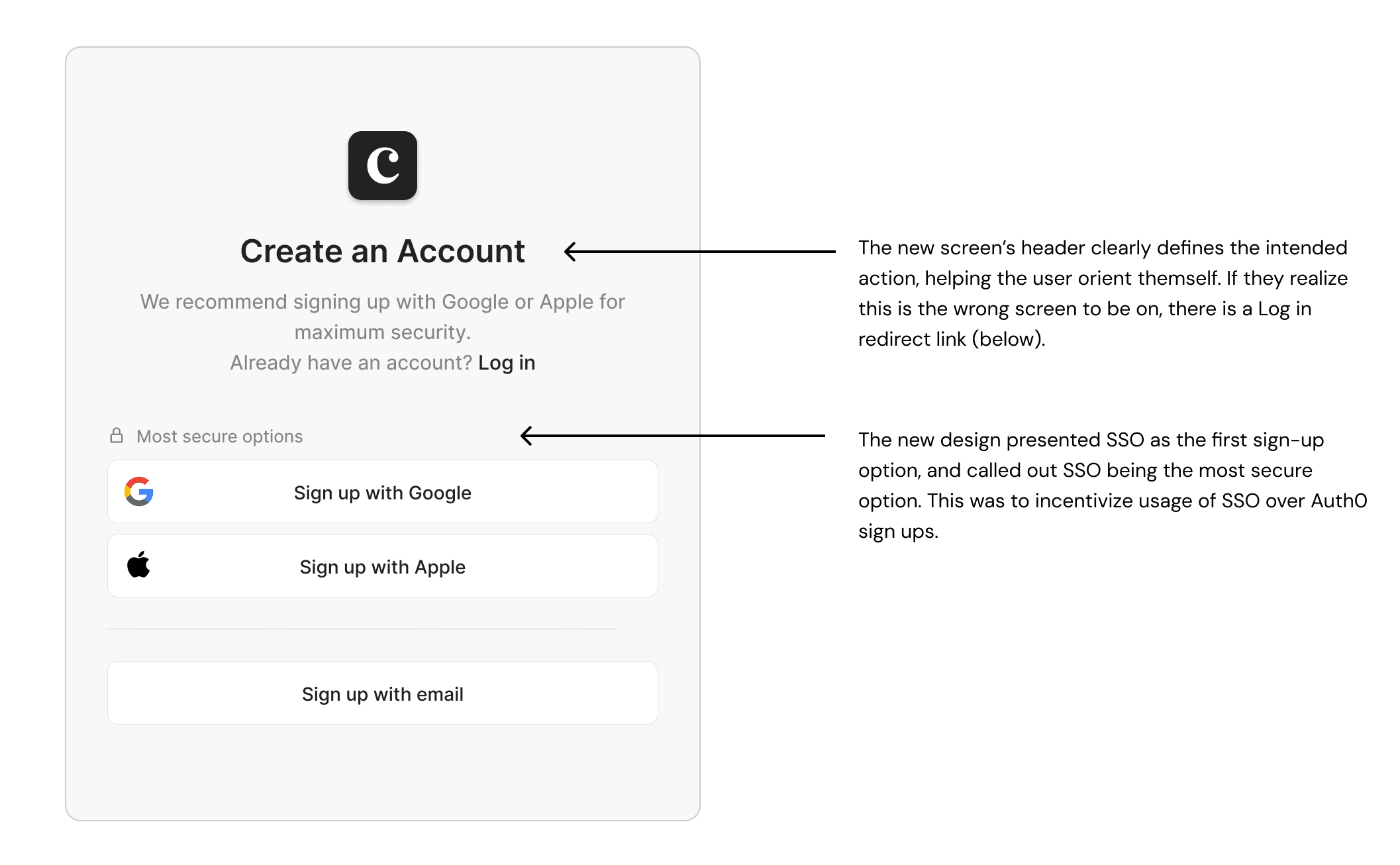
We updated the anguage to better differentiate entry points, changing from "Get Started" and "Client Login" to clearer "Create Account" and "Login" headers. We also added strategic exit pathways allowing users to switch flows if they landed on the wrong screen.

1. Improving Findability

We updated the anguage to better differentiate entry points, changing from "Get Started" and "Client Login" to clearer "Create Account" and "Login" headers. We also added strategic exit pathways allowing users to switch flows if they landed on the wrong screen.

1. Improving Findability

We updated the anguage to better differentiate entry points, changing from "Get Started" and "Client Login" to clearer "Create Account" and "Login" headers. We also added strategic exit pathways allowing users to switch flows if they landed on the wrong screen.

2. Smart Authentication

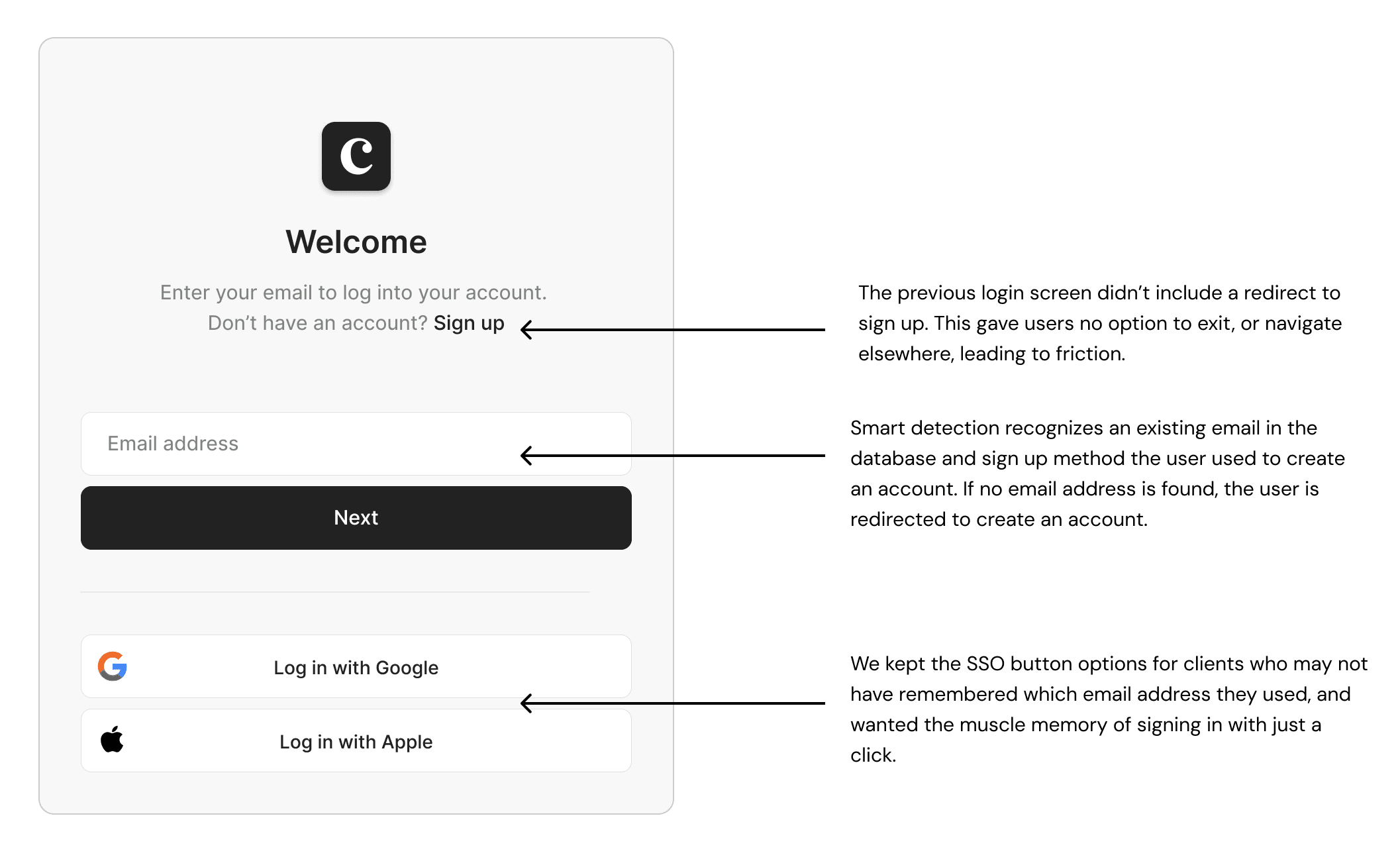
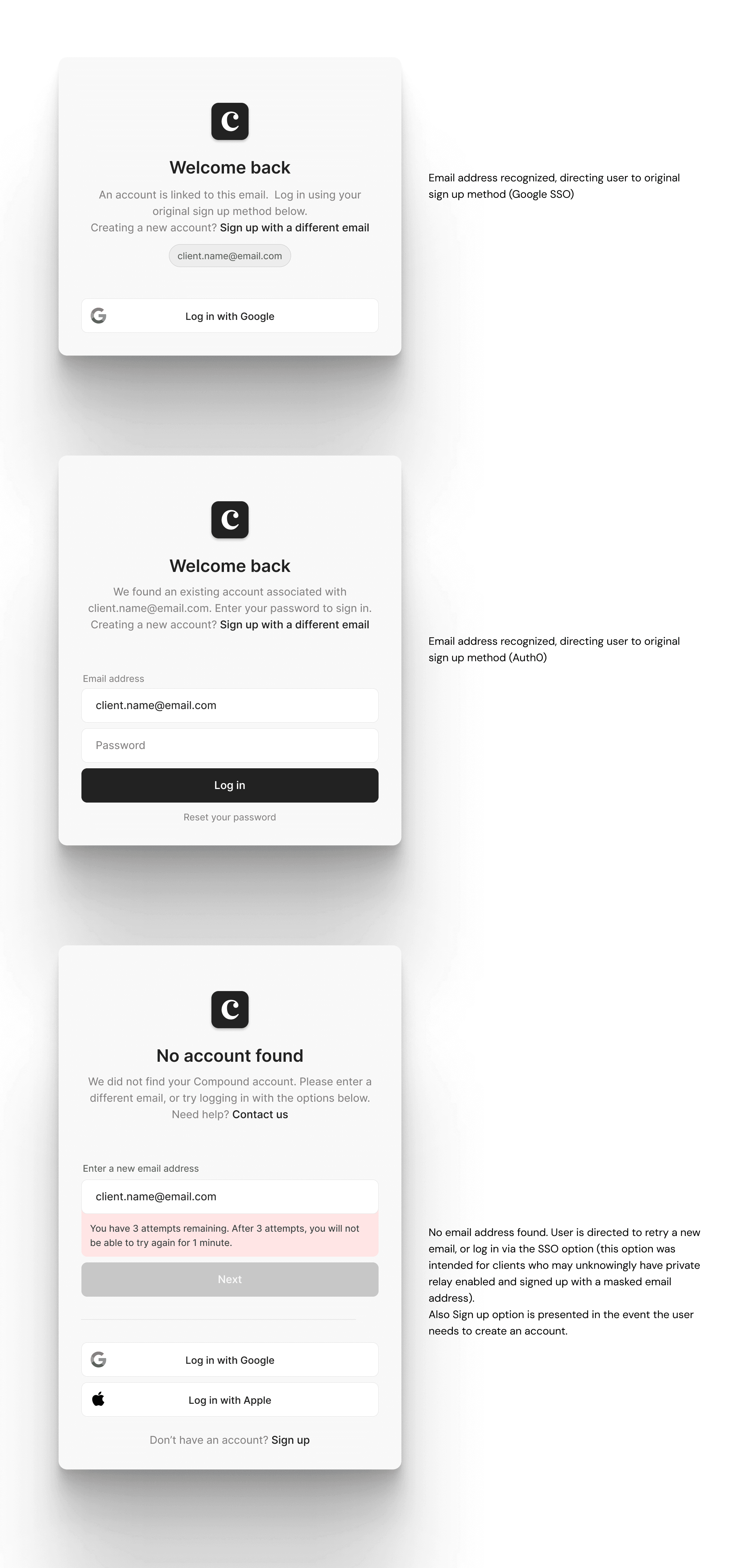
When users enter their email, the system identifies their original sign-up method and routes them to the appropriate login flow (e.g., Gmail for Google SSO, password field for Auth0). If no matching account is found, built-in guardrails gently guide the user to create a new account. Retaining the SSO options below the email field was intentional. This design choice addresses issues with masked Apple emails (e.g., private.relay.com) and forgotten secondary emails while leveraging user muscle memory for a more seamless experience.

2. Smart Authentication

When users enter their email, the system identifies their original sign-up method and routes them to the appropriate login flow (e.g., Gmail for Google SSO, password field for Auth0). If no matching account is found, built-in guardrails gently guide the user to create a new account. Retaining the SSO options below the email field was intentional. This design choice addresses issues with masked Apple emails (e.g., private.relay.com) and forgotten secondary emails while leveraging user muscle memory for a more seamless experience.

2. Smart Authentication

When users enter their email, the system identifies their original sign-up method and routes them to the appropriate login flow (e.g., Gmail for Google SSO, password field for Auth0). If no matching account is found, built-in guardrails gently guide the user to create a new account. Retaining the SSO options below the email field was intentional. This design choice addresses issues with masked Apple emails (e.g., private.relay.com) and forgotten secondary emails while leveraging user muscle memory for a more seamless experience.

3. Mandatory Email Verification

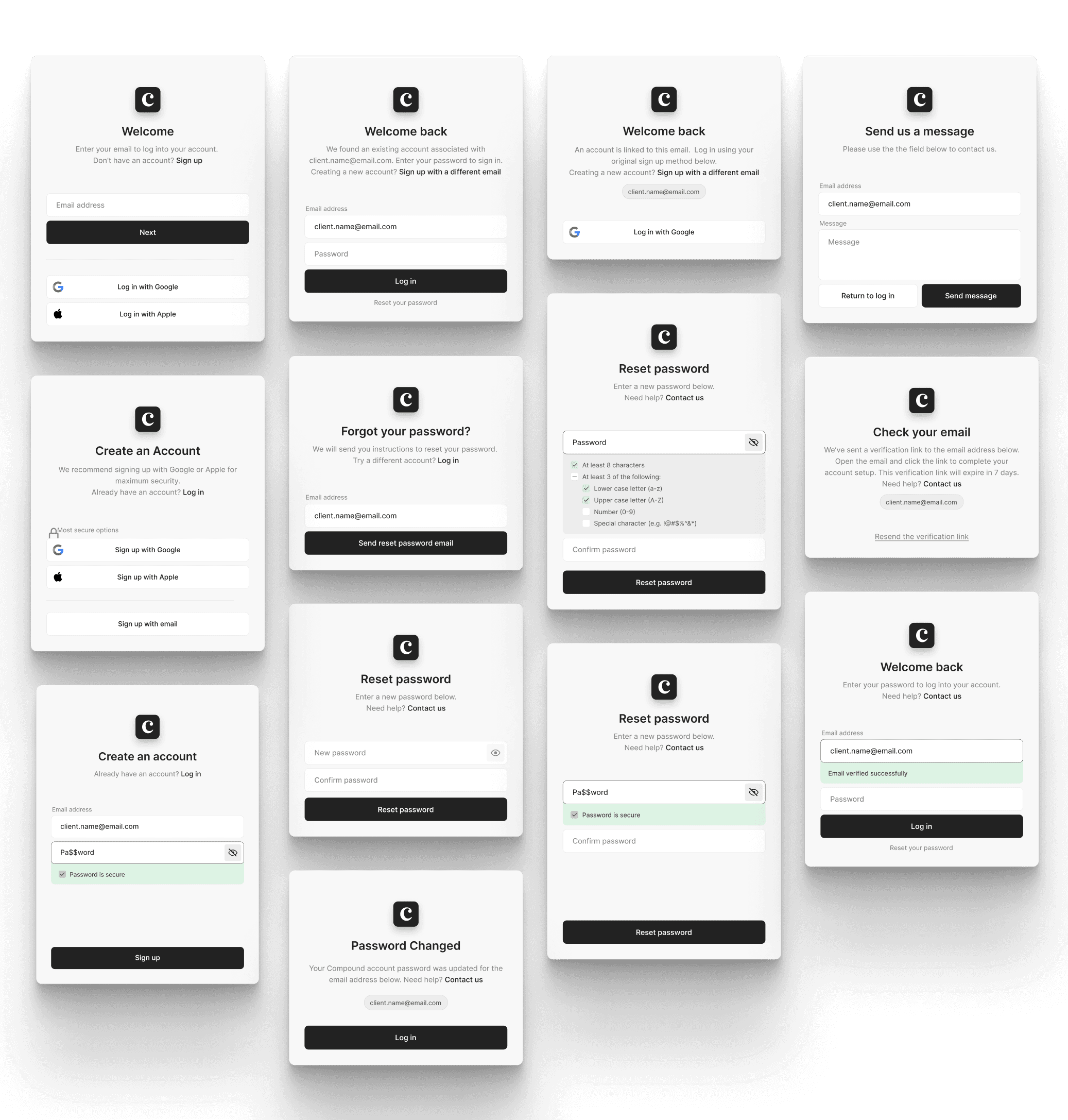
Email verification was added to the account creation flow to prevent users from proceeding with incorrect emails. To further reduce errors, we implemented several protective measures: Password strength requirements with real-time validation Rate limiting on failed login attempts (3 attempts before 1-minute lockout) Clear error messaging explaining what went wrong and how to fix it Consistent "Need help? Contact us" links throughout the flow

3. Mandatory Email Verification

Email verification was added to the account creation flow to prevent users from proceeding with incorrect emails. To further reduce errors, we implemented several protective measures: Password strength requirements with real-time validation Rate limiting on failed login attempts (3 attempts before 1-minute lockout) Clear error messaging explaining what went wrong and how to fix it Consistent "Need help? Contact us" links throughout the flow

3. Mandatory Email Verification

Email verification was added to the account creation flow to prevent users from proceeding with incorrect emails. To further reduce errors, we implemented several protective measures: Password strength requirements with real-time validation Rate limiting on failed login attempts (3 attempts before 1-minute lockout) Clear error messaging explaining what went wrong and how to fix it Consistent "Need help? Contact us" links throughout the flow

Usability Testing

Test Results

Partnering with Engineering and Product, I conducted internal usability tests with 6 team members. Participants walked through key tasks while I measured time-on-task and observed pain points.

100 %

Users who chose the correct path (Login vs. Create Account)

100 %

Users who chose the correct path (Login vs. Create Account)

100 %

Users who chose the correct path (Login vs. Create Account)

83 %

Correctly followed smart-redirect flow for existing accounts

83 %

Correctly followed smart-redirect flow for existing accounts

83 %

Correctly followed smart-redirect flow for existing accounts

1:15 min

Reduction in login time (from 1:45 to 0:32 average)

1:15 min

Reduction in login time (from 1:45 to 0:32 average)

1:15 min

Reduction in login time (from 1:45 to 0:32 average)

Outcomes

Business Impact

User outcomes tracked over two quarters post-launch demonstrated significant improvements across all key metrics.

92%

Correct Pathing

Task success rate in selecting the correct login path, driven by updated UI copy, clearer hierarchy, and improved labels

92%

Correct Pathing

Task success rate in selecting the correct login path, driven by updated UI copy, clearer hierarchy, and improved labels

92%

Correct Pathing

Task success rate in selecting the correct login path, driven by updated UI copy, clearer hierarchy, and improved labels

80%

Reduced Duplicates

Decrease in duplicate account creation post-launch, dramatically reducing engineering support burden

80%

Reduced Duplicates

Decrease in duplicate account creation post-launch, dramatically reducing engineering support burden

80%

Reduced Duplicates

Decrease in duplicate account creation post-launch, dramatically reducing engineering support burden

70%

Improved Confidence

Reduction in password-related lockouts through mandatory email verification, preventing fragmented data and blank dashboards

70%

Improved Confidence

Reduction in password-related lockouts through mandatory email verification, preventing fragmented data and blank dashboards

70%

Improved Confidence

Reduction in password-related lockouts through mandatory email verification, preventing fragmented data and blank dashboards

Reflections

Delivering immediate value through data-driven decisions

This project reinforced the importance of mapping detailed user flows and proactively anticipating potential pain points. I enjoyed the challenge of problem-solving within technical constraints and finding ways to keep users on the right path while reducing friction at such a critical touchpoint.

The experience also taught me valuable lessons about cross-functional collaboration. Working closely with engineers helped me understand what was technically feasible, while stakeholder interviews with financial advisors illuminated how these login issues affected their client relationships and operational efficiency.

Most importantly, seeing the 80% reduction in duplicate accounts and 70% decrease in password lockouts validated that even frontend-focused improvements can drive substantial business impact when grounded in thorough user research.